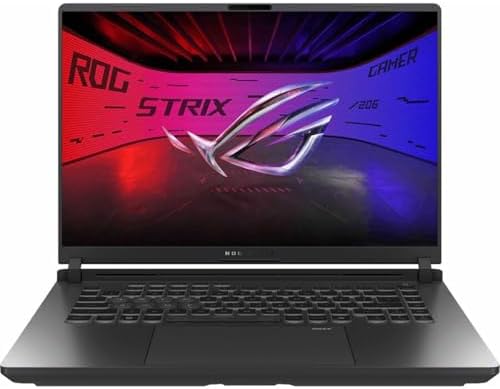
This comparison reveals one of the most fascinating dynamics in gaming laptops: same GPU, wildly different performance. Both the ASUS ROG Strix G16 and Dell Alienware 16 Aurora feature NVIDIA's RTX 5060 GPU, but the ASUS delivers 30% more gaming performance thanks to its 115W TGP versus Alienware's 80W power limit. This creates a classic "power vs portability" tradeoff.
🎮 The GPU Power Paradox: 115W vs 80W = 30% Performance Gap
The most critical difference between these laptops isn't visible on a spec sheet - it's the TGP (Total Graphics Power) configuration of their identical RTX 5060 GPUs.
ASUS ROG Strix G16: 115W TGP (Full Power)
- 3DMark Time Spy: 12,960 - better than most RTX 4060 laptops
- Redfall: 86fps at Epic settings 1080p
- Cyberpunk 2077: 93fps Ultra 1080p with DLSS
- Performance: 15-20% uplift over RTX 4060, matches desktop RTX 4060 Ti in some tests
Gaming benchmarks from Tom's Hardware ROG Strix G16 testing
Dell Alienware 16 Aurora: 80W TGP (Power Limited)
- Indiana Jones: 80fps at 1080p Ultra, 60fps at 1600p
- Shadow of the Tomb Raider: 132fps
- Performance: 30% slower than 115W RTX 5060 due to power limit
- Trade-off: Better battery life, cooler operation
Gaming data from NotebookCheck Alienware 16 Aurora review
According to Tom's Hardware's testing, the ASUS ROG Strix G16 is described as "a well-rounded gaming laptop" with its RTX 5060 delivering significant gains over previous generation hardware. The lower-wattage RTX 5060 in the Alienware is characterized as "affordable starter laptop for 1080p Ultra gaming" and "great entry level gaming laptop, particularly suited for E Sports."
🖥️ Display Battle: OLED 240Hz vs VA 120Hz + Higher Resolution
The display showdown offers two completely different approaches to gaming visuals.
ASUS ROG Strix G16: 15.6" 1920×1080 OLED 240Hz
- Panel Type: OLED - Perfect blacks, infinite contrast ratio
- Refresh Rate: 240Hz - Twice as fast as Alienware
- Response Time: 3ms - Exceptional for competitive gaming
- ROG Nebula Display: Premium color accuracy
- Best for: Competitive FPS, fast-paced games, HDR content
Dell Alienware 16 Aurora: 16" 2560×1600 VA 120Hz
- Panel Type: VA - Good contrast, not OLED-level blacks
- Refresh Rate: 120Hz - Sufficient for most games
- Resolution: 2560×1600 - 78% more pixels than ASUS
- Screen Size: 16" - Larger display area
- Best for: Productivity work, larger workspace, higher-res content
Tom's Hardware praised the ASUS's display quality and noted the laptop's "real advantage is silence - even at full power, doesn't make much noise" with excellent 99.2% stability on the 3DMark stress test showing superior thermals.
NotebookCheck noted the Alienware 16 Aurora is "long on endurance, short on performance" - the higher resolution display combined with the 80W GPU means you'll need to play at 1080p for smooth AAA gaming, leaving those extra pixels unused in demanding titles.
🎨 For Competitive Gaming: OLED 240Hz Wins
If you play competitive shooters (Valorant, CS2, Apex Legends), the ASUS's 240Hz OLED offers a massive advantage. Perfect blacks and 2x refresh rate matter more than resolution.
Buy ASUS ROG G16 →
💼 For Productivity + Gaming: Higher Resolution Helps
If you need the laptop for college work, coding, or content creation, the Alienware's 1600p display gives you more screen real estate. Combined with 48GB RAM, it's better for multitasking.
Check Alienware Price →
⚖️ The Weight Paradox: 10.65 lbs vs 5.68 lbs
This is perhaps the most shocking difference: the ASUS ROG Strix G16 weighs nearly twice as much as the Alienware 16 Aurora.
ASUS ROG Strix G16: 10.65 pounds
- This is a desktop replacement, not a portable laptop
- Equivalent to carrying 2-3 MacBook Airs
- Not practical for daily commutes or college classes
- Best used on a desk with AC power
- The weight comes from larger cooling system, battery, and premium build
Dell Alienware 16 Aurora: 5.68 pounds
- Nearly half the ASUS weight - huge portability win
- Comfortable for backpack carry
- Practical for college students
- Can be used on lap or small desks
- Better for gaming on the go
The weight difference is so significant it fundamentally changes how you use each laptop. The ASUS is essentially a portable desktop - powerful but heavy. The Alienware is a true mobile gaming laptop.
🧠 CPU Performance: Ultra 9 275HX Destroys Core 7 240H
The CPU gap is even larger than the GPU gap.
ASUS: Intel Core Ultra 9 275HX
- Cores: 24 cores (vs 10 in Alienware)
- Architecture: Arrow Lake 3nm (vs Raptor Lake 10nm)
- Base Clock: 2.7GHz, Boost to 5.4GHz
- Performance: 128% faster than Core 7 240H according to Technical.city benchmarks
Alienware: Intel Core 7 240H
- Cores: 10 cores
- Architecture: Raptor Lake (older generation)
- Base Clock: 2.5GHz
- Performance: Adequate for gaming, weaker for productivity
Technical.city's CPU comparison states the "Ultra 9 275HX significantly outperforms across the board" with 128% better performance. This matters for streaming, video editing, coding, and heavily multithreaded workloads - but less important for pure gaming at 1080p where GPU is the bottleneck.
💾 RAM & Storage: Alienware Dominates Capacity
In a surprising twist, the less expensive Alienware offers significantly more memory and storage.
ASUS ROG Strix G16:
- 32GB LPDDR5 RAM (soldered, non-upgradeable)
- 1TB NVMe SSD
- Total Value: Standard for this price point
Dell Alienware 16 Aurora:
- 48GB DDR5 RAM - 50% more than ASUS
- 2TB NVMe SSD - Double the ASUS capacity
- Better for content creators, heavy multitaskers
- Can store 2x as many games
For content creators running Adobe Creative Cloud, developers with multiple VMs, or gamers with massive game libraries, the Alienware's 48GB RAM and 2TB storage provide significantly more headroom.
🔋 Battery Life: Alienware Wins by Default
NotebookCheck described the Alienware 16 Aurora as "long on endurance" thanks to the 80W TGP limiting power consumption. The ASUS ROG Strix G16, being a 10.65 lb desktop replacement with a 115W GPU, prioritizes plugged-in performance over battery life.
Expected Battery Life:
- ASUS ROG G16: 2-3 hours gaming, 5-6 hours light use (estimated based on high TGP)
- Alienware 16 Aurora: 4-5 hours gaming, 8-10 hours light use (better efficiency from 80W GPU)
If you plan to use the laptop unplugged for classes, coffee shops, or travel, the Alienware is the only realistic choice.
💰 Value Analysis: $1,699 vs $1,769
Despite being $70 more, the Alienware actually offers more hardware in some categories:
ASUS ROG Strix G16 at $1,699 (15% off from $1,999):
- ✅ 30% faster gaming (115W GPU)
- ✅ 128% faster CPU (24 cores)
- ✅ OLED 240Hz display (premium)
- ✅ Better thermals, silent operation
- ❌ Half the storage (1TB vs 2TB)
- ❌ 33% less RAM (32GB vs 48GB)
- ❌ Nearly double the weight (10.65 lbs vs 5.68 lbs)
Dell Alienware 16 Aurora at $1,769:
- ✅ Nearly half the weight (5.68 lbs)
- ✅ 50% more RAM (48GB)
- ✅ 2x storage capacity (2TB)
- ✅ Better battery life
- ✅ Higher resolution display (1600p)
- ❌ 30% slower gaming (80W GPU)
- ❌ Weaker CPU (10 cores vs 24)
- ❌ Half the refresh rate (120Hz vs 240Hz)
🏆 Gaming Performance Winner: ASUS ROG Strix G16
If you prioritize maximum FPS in AAA games, 240Hz OLED visuals, and desktop-replacement power, the ASUS ROG Strix G16 is worth the weight penalty. Its 115W RTX 5060 and Ultra 9 CPU are significantly faster.
Get ASUS ROG G16 - $1,699
🎒 Portability/Value Winner: Dell Alienware 16 Aurora
If you need a truly portable gaming laptop with massive storage/RAM, better battery life, and half the weight, the Alienware 16 Aurora offers better real-world usability for only $70 more.
Check Alienware Price - $1,769
🎯 Who Should Buy Each Laptop?
Buy ASUS ROG Strix G16 If You:
- Play at a desk 95%+ of the time - Weight doesn't matter if it never moves
- Want maximum 1080p gaming FPS - 115W RTX 5060 is 30% faster
- Play competitive shooters - 240Hz OLED is a massive advantage
- Love OLED displays - Perfect blacks and HDR for single-player games
- Need CPU horsepower - 24-core Ultra 9 for streaming/editing
- Have AC power nearby - Battery life isn't a concern
Buy ASUS ROG G16 on Amazon
Buy Dell Alienware 16 Aurora If You:
- Need true portability - 5.68 lbs goes anywhere, 10.65 lbs doesn't
- Are a college student - Carry to classes, game after homework
- Travel frequently - Airport carry, hotel gaming
- Need massive storage - 2TB holds your entire game library
- Run memory-heavy workloads - 48GB RAM for VMs, content creation
- Want better battery life - 80W GPU sips power vs 115W
- Play E-sports titles - CS2, Valorant, League run great at 120Hz
Buy Alienware 16 on Amazon
🚨 Important Considerations
The 80W vs 115W GPU Tradeoff is REAL: Don't buy the Alienware expecting equivalent gaming performance. You're trading 30% FPS for portability, battery life, and more RAM/storage.
The ASUS Weight is SERIOUS: 10.65 pounds is backpack-breaking weight. Make sure you genuinely want a desktop replacement before committing.
Webcam Quality: NotebookCheck noted the Alienware has a 720p webcam, below the 1080p standard emerging in premium laptops. The ASUS likely has better webcam quality.
Upgradeability: The ASUS has soldered LPDDR5 RAM (non-upgradeable). The Alienware likely uses standard DDR5 SO-DIMMs (upgradeable). Storage can be expanded on both.
📊 Final Verdict
This comparison boils down to power vs portability:
The ASUS ROG Strix G16 is a desktop replacement monster. Its 115W RTX 5060, 24-core CPU, and 240Hz OLED make it a gaming powerhouse - but you're committing to plugged-in desk use. Perfect for home gaming battlestations.
The Dell Alienware 16 Aurora sacrifices 30% gaming performance for real-world usability. It weighs half as much, has double the storage, 50% more RAM, and better battery life. Perfect for mobile gamers and college students.
Our Recommendation: Unless you absolutely need maximum FPS and never plan to move the laptop, the Alienware 16 Aurora's portability advantage makes it the smarter choice for most users. The performance difference only matters at 1080p Ultra - at 1600p both GPUs deliver similar frame rates since resolution is the bottleneck.