Why Choose a Touchscreen Laptop in 2026?
Touchscreen laptops have evolved from niche novelty to mainstream productivity powerhouse. With 57% of modern laptops featuring touch capabilities, they've become essential tools for students, creatives, and professionals alike.
Take handwritten notes with a stylus, perfect for students and professionals who learn better through writing.
Sketch, draw, and design with precision using active stylus support on models like Microsoft Surface and HP Spectre.
2-in-1 convertibles transform from laptop to tablet, offering the versatility of two devices in one.
Swipe, pinch, and zoom through content naturally—ideal for photo editing, web browsing, and presentations.
Top 5 Touchscreen Laptops for 2026
Based on our analysis of 97 touchscreen-enabled laptops, here are the best options across different budgets and use cases:

- ✓ Intel Core i7 Processor
- ✓ 16GB RAM, 256GB SSD
- ✓ 13.5" PixelSense Display (2560x1600)
- ✓ Premium touchscreen with stylus support
- ✓ 67% OFF - Amazing Deal!

- ✓ Intel Celeron Processor
- ✓ 4GB RAM, 64GB eMMC
- ✓ 14" HD Touch Display (1366x768)
- ✓ 1-Year Office 365 included
- ✓ Perfect for students & budget users
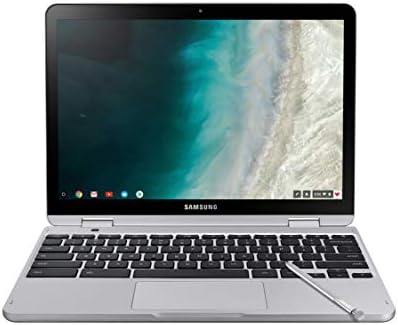
- ✓ Intel Celeron Processor
- ✓ 4GB RAM, 64GB eMMC
- ✓ 12.2" FHD Touch Display (1920x1200)
- ✓ 360° hinge for tablet mode
- ✓ Built-in stylus included

- ✓ MediaTek Kompanio 520 8-Core
- ✓ 4GB RAM, 64GB eMMC
- ✓ 14" FHD Touch Display
- ✓ Ultra-portable at 2.87 lbs
- ✓ Best budget touchscreen option

- ✓ Intel Celeron N4500
- ✓ 4GB RAM, 128GB SSD
- ✓ 15.6" Touchscreen Display
- ✓ Thin & portable design
- ✓ Top-rated for value
Touchscreen vs Non-Touchscreen: What You Need to Know
| Feature | Touchscreen Laptop | Non-Touchscreen Laptop |
|---|---|---|
| Price | +$50-$150 premium | More affordable |
| Battery Life | 8-10 hours (slight reduction) | 9-12 hours |
| Creativity | ✓ Stylus support, drawing, annotations | Mouse/trackpad only |
| Versatility | ✓ Can use as tablet (2-in-1s) | Laptop mode only |
| Navigation | ✓ Touch, trackpad, or mouse | Trackpad or mouse |
| Weight | Slightly heavier (0.2-0.5 lbs) | Lighter |
How to Choose the Right Touchscreen Laptop
1. Determine Your Use Case
Students: Look for budget-friendly options like HP or Lenovo Chromebooks ($170-$300) with touch support for note-taking.
Creatives: Invest in premium models like Microsoft Surface or HP Spectre ($800+) with active stylus and high-resolution displays.
Business: 2-in-1 convertibles like Dell Latitude or Lenovo ThinkPad offer flexibility for presentations and collaboration.
Casual Users: Mid-range touchscreen laptops ($300-$600) provide the best value for everyday browsing and media consumption.
2. Screen Quality Matters
For the best touchscreen experience, prioritize:
- Resolution: Minimum 1920x1080 (FHD) for sharp text and images
- Panel Type: IPS or OLED for better viewing angles
- Brightness: 300+ nits for outdoor visibility
- Touch Response: Look for 10-point multitouch support
3. Stylus Support (Optional but Valuable)
If you plan to draw or take handwritten notes, ensure the laptop supports:
- Active Digitizer: Wacom or Microsoft Pen Protocol
- Pressure Levels: 1024+ levels for natural drawing
- Palm Rejection: Essential for comfortable writing
- Included Stylus: Surface Pen, HP Pen, or compatible alternatives
4. 2-in-1 Convertible vs Standard Touchscreen
Choose a 2-in-1 if: You want tablet mode for reading, presentations, or media consumption. 360° hinges or detachable keyboards offer maximum flexibility.
Choose standard touchscreen if: You primarily use laptop mode and want better performance/price ratio. Touch is a bonus feature, not the main selling point.
Frequently Asked Questions
Ready to Find Your Perfect Touchscreen Laptop?
Compare all 97 touchscreen laptops with our advanced filtering system. Sort by price, specs, and ratings to find the best deal.
Browse All Touchscreen Laptops